Set your organisation’s time zone in AdPilot
Contents
Your organisation’s time zone decides what “today” means in AdPilot: the to-do list, when the daily limits refill and when AdPilot scans your Google Ads accounts each morning. The organisation owner picks it in the Team section of the ALFA Members area; invoices and plan periods still use Vietnam time. This article covers where to set it, what it changes, what stays on Vietnam time, the time-zone line on the app screens and how it differs from an ad account’s time zone.
1. Where the time zone box is
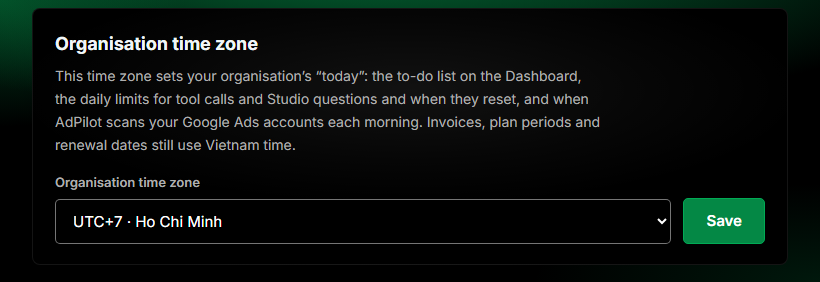
Open the ALFA Members area and go to the “Team” section. Below the organisation name is the “Organisation time zone” block (source).
- The organisation owner sees a box to choose from and a “Save” button.
- Other members can only read “Organisation time zone: {time zone}. Only the organisation owner can change it.”
If you belong to several organisations, pick the one you want in the organisation selector on the screen before reading or changing it.
2. Pick and save the time zone
Each entry in the list looks like “UTC{offset} · {city}”, for example “UTC+7 · Ho Chi Minh”. The list is sorted by offset, then by name; city names are in English (such as “New York”). Plain UTC shows as “UTC+0”.
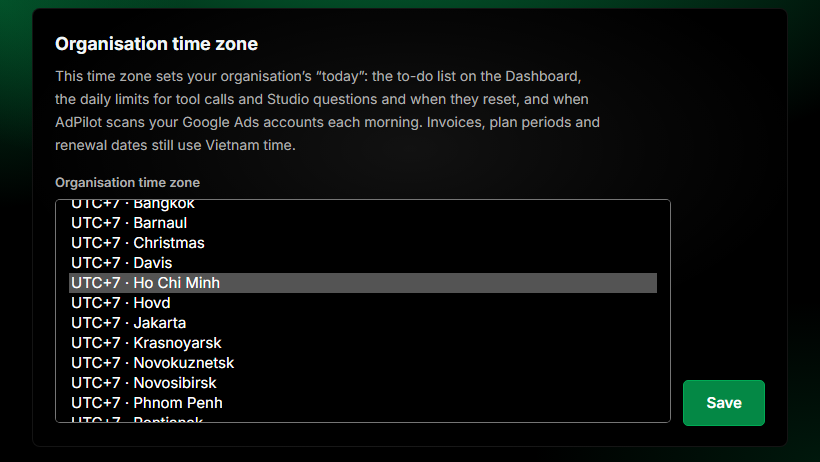
- Pick a time zone in the box.
- Click “Save”.
- The page says “Organisation time zone saved: {time zone}. “Today” follows this time zone from now on.”
If it can’t be saved, the page shows one of these:
- “That time zone isn’t valid. Pick one from the list.”
- “The time zone wasn’t changed: only the organisation owner can change it.”
- “The time zone wasn’t changed: changing it is turned off for now.”
3. What the time zone changes
The note under the box says the time zone sets your organisation’s “today” (source). In detail:
- The to-do list on the Dashboard. On the AdPilot for Google Ads Dashboard, the list is kept until the end of the day in your organisation’s time zone; the time-zone label sits at the end of that sentence.
- The daily limits for tool calls and Studio questions. Hit the daily cap and it refills at midnight in your organisation’s time zone, and the screen tells you exactly when (source). Studio shows “Questions refill at …” with a time-zone label (source).
- When AdPilot scans your Google Ads accounts each morning. AdPilot scans each morning in your organisation’s time zone (source).
4. What the time zone doesn’t change
Invoices, plan periods and renewal dates still use Vietnam time, even if the organisation picks another time zone. The ALFA team’s working hours are also given in Vietnam time.
5. The time-zone line on the app screens
The top of the AdPilot for Google Ads and AdPilot for Meta Ads screens has a line showing the time zone, based on your organisation’s time zone:
| Organisation time zone | Line at the top of the screen |
|---|---|
| Vietnam | “Vietnam time (UTC+7)” |
| Any other | “Your organisation’s time zone (UTC+9)”; the label shows the offset of the zone you picked |
Times on the screen are shown in that time zone. On AdPilot for Google Ads only: if your device is set to a different time zone from the organisation’s, the line changes to “Your device time” and the times of events on the screen follow your device.
On AdPilot for Meta Ads, the daily limit line also carries the label: “The daily limit resets at {time} (UTC+9).”
6. How it differs from an ad account’s time zone
The organisation time zone is for AdPilot and ALFA. Ad figures still follow the time zone of each ad account. For example, the Overview block of AdPilot for Meta Ads says “Account time zone: UTC+7.” (source), and Meta’s breakdown reports follow the ad account’s time zone (source). Changing the organisation’s time zone doesn’t change an ad account’s time zone.
7. Frequently asked questions
I can’t see the “Organisation time zone” block. Check that you’re looking at the right organisation (the organisation picker at the top of the Team section, if you belong to more than one). If it still isn’t there, message the ALFA support group.
I’m a member. Can I change it? No. Only the organisation owner can; members can only read it.
Does changing it move the dates on invoices? No. Invoices, plan periods and renewal dates still use Vietnam time.
When does the change take effect? “Today” follows the new time zone from the moment you save.